
Density & resizing
What density means
Section titled “What density means”Density is how closely packed the stitches are — the spacing between rows in a fill, or between zigzag “bites” in a satin column. It’s the single biggest factor in how a design sews:
- Too dense and the thread piles up, the fabric stiffens, and you risk thread breaks or needle damage.
- Too sparse and the fabric shows through with thin, gappy coverage.
Octostitch works in real millimetres, and stitch settings like spacing_mm are
expressed in those real-world units, so the density you set is the density you get.
Density-aware resize
Section titled “Density-aware resize”In many older tools, scaling a design just stretches the existing stitches — make a design bigger and the rows spread apart into gaps; make it smaller and they bunch up into a solid, unstitchable mass.
Octostitch avoids this. Because each object stores its path and stitch settings rather than a frozen set of stitch points, resizing scales the geometry and then regenerates the stitches from the new size at the original density.
The practical result:
- Scale a fill up and it gets more rows, not wider gaps.
- Scale a satin column down and it stays properly covered, not bunched.
- The spacing, underlay and stitch lengths you chose still apply at the new size.
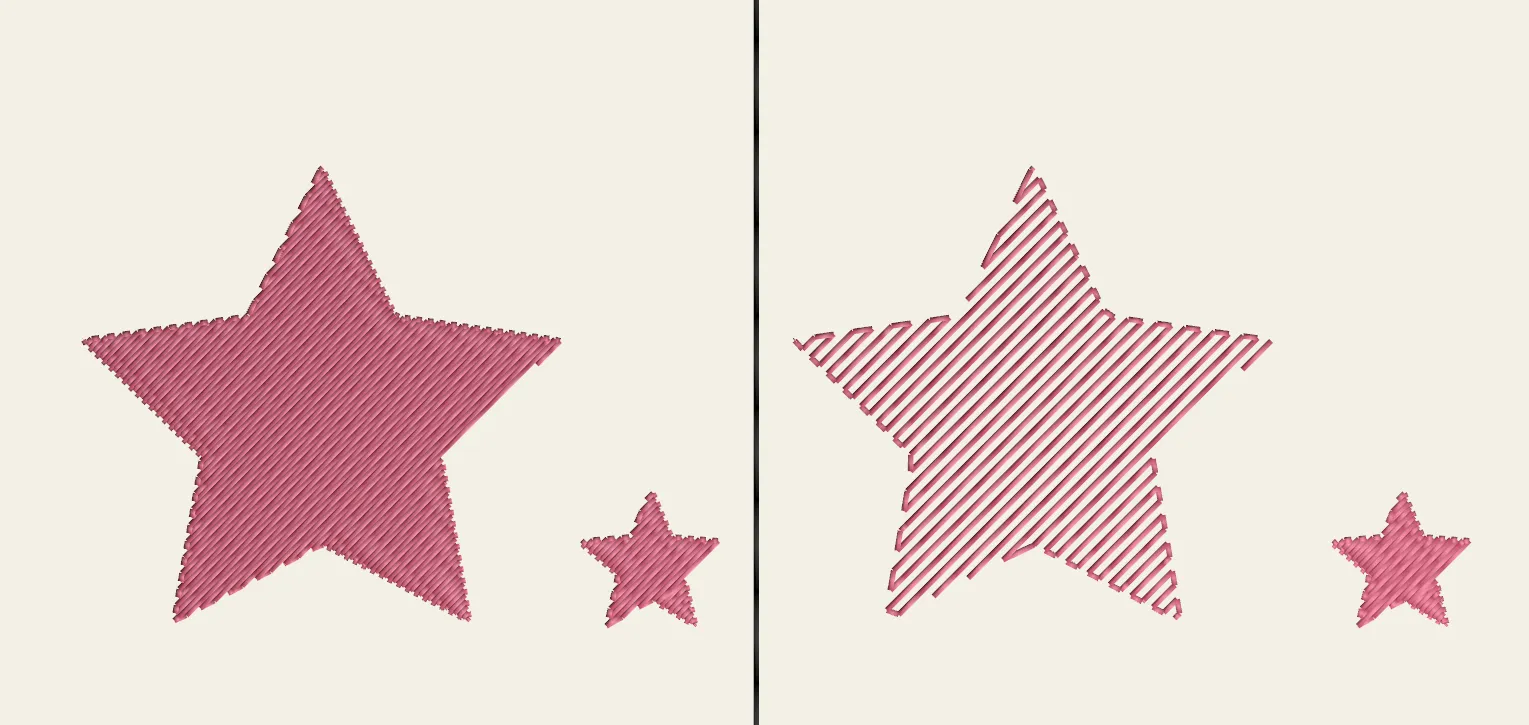 Density-aware resizing (left) adds rows as the fill grows; a naive stretch (right) just opens up gaps.