
Running & bean
Running and bean are the two line stitches — they follow a path as a simple line, for outlines, detail and travel runs. They work on open or closed paths.
Running stitch
Section titled “Running stitch”A running stitch is a single line of evenly spaced stitches along the path — the plainest stitch there is. It’s used for fine outlines, redwork-style detail, and as a low-profile travel stitch between areas.
Settings:
- Spacing (
spacing_mm) — the length of each stitch. Shorter spacing follows tight curves more faithfully; longer spacing sews faster and looks more like a dashed line. - Random variation — optionally jitter each stitch length by a fraction of the spacing (0 = perfectly uniform). A little randomness breaks up the mechanical look and can read as a hand-stitched line.
Bean stitch
Section titled “Bean stitch”A bean stitch (triple run) walks each stitch back and forth so the line is sewn multiple times, giving a bolder, heavier outline without switching to satin.
Settings:
- Spacing (
spacing_mm) — stitch length, as with running. - Repeat count — how many passes each stitch makes (a classic bean is 3: forward, back, forward).
- Random variation — the same optional length jitter as running stitch.
Redwork routing
Section titled “Redwork routing”Redwork routing is a tick box on both the running and bean panels. It changes the order the line work is sewn in, not the stitches themselves: instead of sewing each subpath on its own and jumping to the next, Octostitch treats the whole object as one network of lines and sews it as a single continuous thread, doubling back only where the line work leaves no alternative.
That’s the traditional redwork look — a line drawing worked in one unbroken run. It’s what you want for traced outline art, monograms, quilting motifs and colouring-book style designs, where a trail of jumps and trims between strokes is more work to clean up than the stitching itself.
It’s off by default. Tick it and two settings appear.
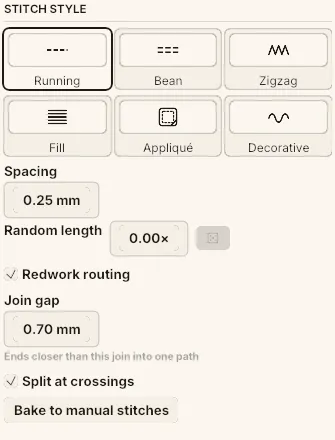 Redwork routing on a running stitch. Join gap and Split at crossings only appear once the box is ticked — the drag reads in millimetres, and the line under it is the reminder of what the tolerance is doing.
Settings:
- Join gap — how far apart two line ends can be and still count as the same junction (default 0.5 mm; 0.05 mm is the smallest it will go). Traced and hand-drawn artwork rarely meets exactly, so a small tolerance lets lines that nearly touch route as connected. Raise it if strokes that visibly meet are still sewing separately; lower it if lines you deliberately drew apart are being welded together.
- Split at crossings — cut the paths where they cross, so the route sews through the crossing point (on by default). With it off, an X is routed around its centre instead, which means more doubling back.
What it does with the geometry
Section titled “What it does with the geometry”- Lines that genuinely don’t touch stay separate. Each connected group becomes its own run and the machine still jumps between them, so a design of scattered strokes won’t come out as one thread however the settings are set. The groups sew nearest-first to keep those jumps short.
- Where the network can’t be walked in one pass — a T junction, a stroke that dead-ends — the shortest stretch that closes the gap is sewn twice. That retracing is the price of continuity; Octostitch minimises it rather than removing it.
- The route chooses its own two ends — the pair that saves the most thread — and starts at whichever of them the needle is nearest. So a redwork run doesn’t necessarily begin where the path begins.
- On bean, the repeats still apply per stitch — so bean plus redwork is the classic redwork triple run: one continuous line, worked three times over.
An object with routing on shows the redwork icon in the object list instead of the running or bean one, because routing changes what it sews as much as the base style does.
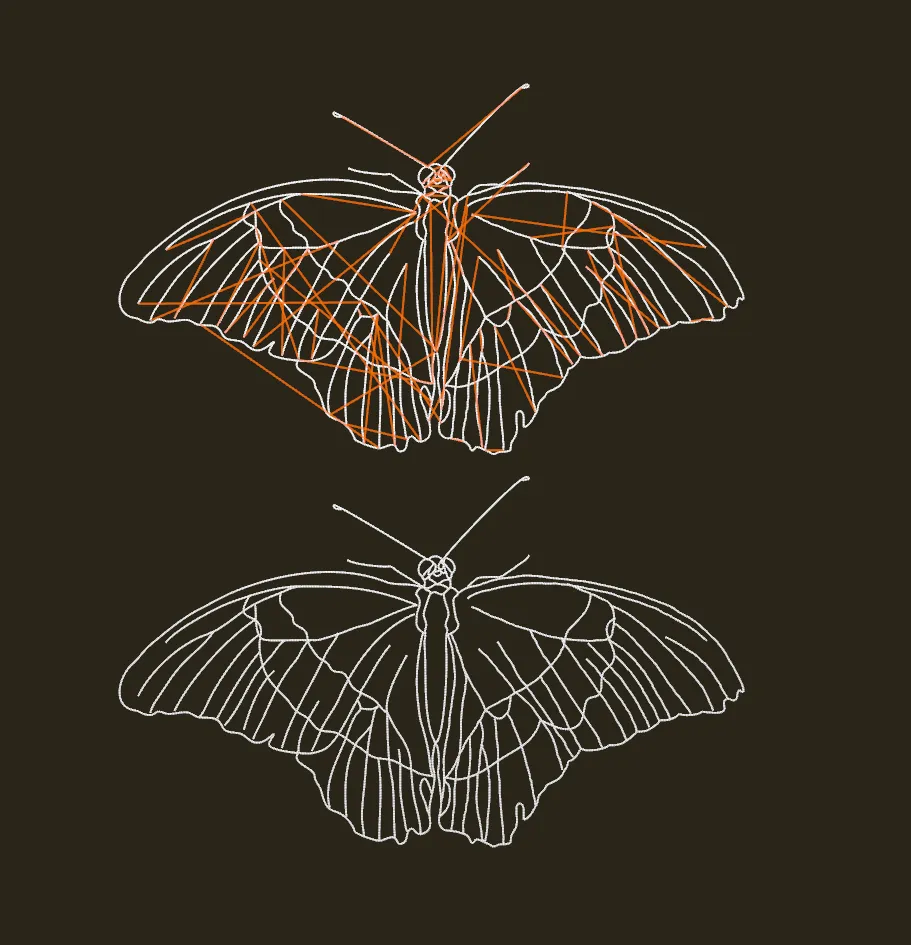 The same traced butterfly, sewn twice with jump stitches shown. Top: routing off — every stroke is sewn on its own and the orange jumps between them cross the whole design. Bottom: routing on — the same line work as one continuous run, with no jumps left to trim.
Redwork routes the line work within one object; branching does the comparable job across several objects. A single traced drawing is usually one object, so redwork is the tool for it.