
Colour sequence & sorting
The order your colours sew in matters: every time the thread colour changes, the machine stops for a colour change. Fewer changes means a faster, tidier stitch-out.
Colour sequence
Section titled “Colour sequence”The colour sequence is just the order colours appear as the design sews top-to- bottom through the object list.
You sequence colours by hand from the Colours tab of the side panel in the top
right. Switch to that tab and your design is grouped into colour blocks in sewing
order. To change the sequence, select a colour block and use the same reorder
shortcuts as objects — Page Up / Page Down to move a block one step, Home /
End to send it to the top or bottom. Adjacent blocks of the same colour merge into
one, so you only change thread once for them.
The exported machine file and the production worksheet both use this exact order, so what you arrange here is what your machine does.
A fill with a gradient on it is one object but several colour blocks — one pass per stop, sewn in order. It costs a thread change per stop, so a four-stop ramp is four colours on the worksheet.
Automatic colour sorting
Section titled “Automatic colour sorting”Octostitch can auto-sort the design to minimise thread changes: it groups objects that share a colour together, so all the red sews in one pass, all the navy in another, and so on.
Crucially, it does this without breaking your design:
- Objects that physically overlap keep their relative stacking order — the sort never moves something that sits on top of another object beneath it. (Overlap is judged by bounding boxes, a deliberately cautious test.)
- Grouped constructs stay intact — a branch group’s members and a text box’s letters each move as a single unit, never split apart.
- Guide paths are left out of the sort.
The result is the fewest colour changes possible that still respects what has to sew in a particular order.
Run it with the Colour Sort button in the side panel, near the layer-reorder controls below the object list. It needs at least two objects to have anything to sort.
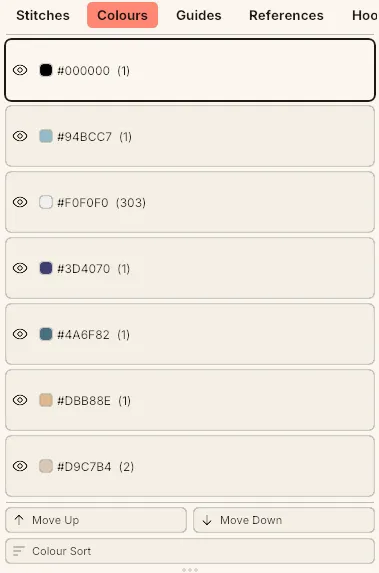 The Colours tab: one row per colour block with its stitch count, reordered with Move Up / Move Down or grouped automatically with Colour Sort.