
Reference images
A reference image is a picture you place on the canvas to trace over by hand. It sits behind your work as a guide and is never stitched or exported — it’s just there to draw against.
Adding a reference image
Section titled “Adding a reference image”Bring in an image and position it on the canvas over the area you want to digitise. Supported formats are PNG, JPG/JPEG, BMP, WebP and GIF.
Once placed, you can move, scale and rotate the reference to line it up with your design, then draw your stitch objects on top with the Pen, Shape or Satin tools.
Adjusting a reference
Section titled “Adjusting a reference”A few settings help you trace comfortably:
- Opacity — fade the image so it sits quietly under your stitching, or turn it up to see fine detail while you draw.
- In front / behind — choose whether the image renders behind your stitches (the default, for tracing over) or in front of them (handy for checking your stitching lines up against the original artwork).
- Width / Height — the image’s size on the canvas in millimetres, so you can scale it to a measurement you’ve taken rather than by eye. Lock ratio is on by default and keeps the proportions: a reference exists to be traced, and a silently stretched one throws off every measurement you take from it. Untick it to fit an image that’s already distorted. The same lock applies to the on-canvas scale handles.
Resizing works from the centre, so the image doesn’t wander off its position while you adjust it.
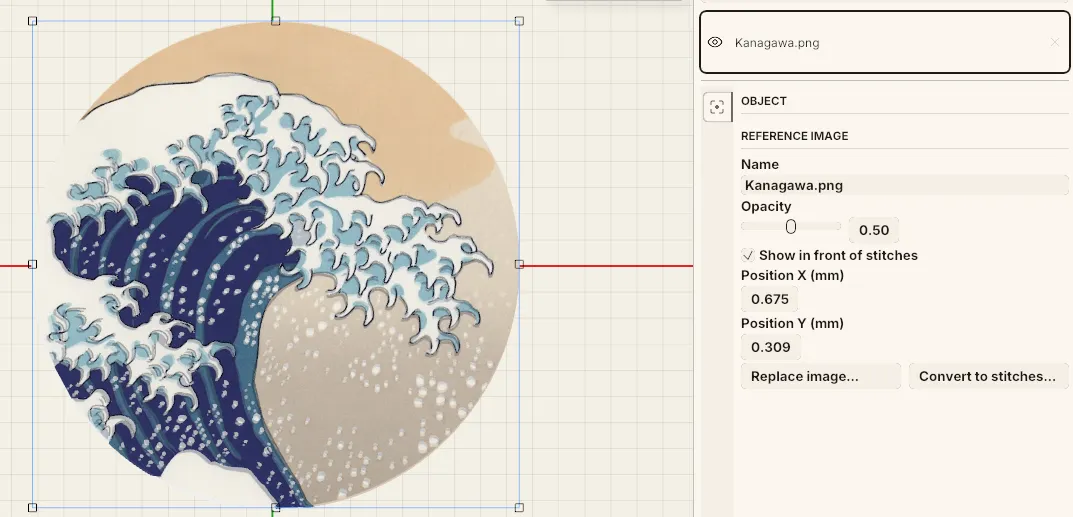 A reference image on the canvas, with its opacity, “Show in front of stitches” and position controls in the side panel.
The References tab
Section titled “The References tab”Reference images are managed in their own References tab in the side panel, separate from your stitch objects — so they never clutter the object list or the sewing order. In that tab you can select, transform and remove references. While the References tab is active, only the Select tool applies (you transform references, you don’t draw into them).
From reference to stitches
Section titled “From reference to stitches”A reference is for manual tracing, but you can also hand one straight to auto-digitising — convert the reference image in place and the traced result lands right over it, ready to refine.