
Guides & cut lines
A guide is a path that never turns into thread. It exists only to tell a fill something about how to stitch: which way the rows should run, or where a seam should be drawn through them. Guides don’t appear in the stitch count, in the colour sequence or in any exported file.
Creating a guide
Section titled “Creating a guide”Guides live in their own tab in the side panel.
- Open the Guides tab.
- Click Create Guide. Octostitch adds an empty guide and switches to the Pen tool so you can start drawing straight away.
- Click along the canvas to draw the guide’s path, exactly as you would any other
Bézier path. Edit it afterwards with the Edit tool (
N).
Until it has a path, the panel reminds you the guide is empty — “Draw this guide with the Pen tool (B)”. Once it’s drawn, the same line tells you how many fills are using it, so a guide you’ve forgotten about is easy to spot.
Guides have a guide colour rather than a thread colour (set it in the Object group), so you can tell several apart on the canvas. Rename them there too — the name is what you’ll pick from in a fill’s settings, so “Petal direction” beats “Guide 3”.
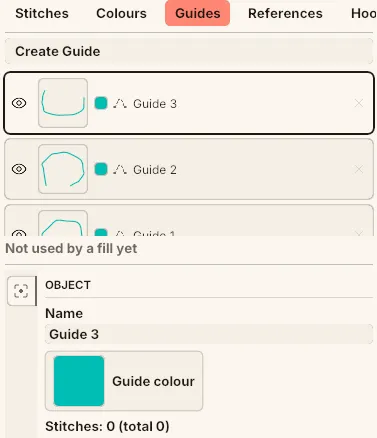 Three guides with their path thumbnails and eye toggles. Guide 3 is selected — the status line reads “Not used by a fill yet”, and its name and guide colour are set in the Object group underneath.
When guides are drawn
Section titled “When guides are drawn”Guides would clutter the canvas if they were all visible all the time, so by default Octostitch shows only the ones that matter right now: any guide the current selection uses, plus everything in the list while the Guides tab is open. To keep them all on screen permanently, tick Show all guides in Display options. Hiding a guide with its eye toggle takes it out of use entirely — the fills that reference it fall back to stitching without it.
Steering a fill’s direction
Section titled “Steering a fill’s direction”A parallel fill normally lays its rows at a fixed angle across the whole shape. That looks wrong on anything organic: a leaf wants its stitches running along the leaf, not at 45° to it.
Select the fill, and in the Stitch group pick your guide from the Guide dropdown. The rows now follow the guide’s curve instead of a fixed angle, flowing around the shape.
- Only the parallel fill takes a direction guide — circular and spiral fills get their direction from their own geometry, and satin fill spans the shape edge-to-edge.
- The guide doesn’t have to sit inside the shape, and it doesn’t have to touch it. It describes a direction field; the fill reads the flow from it.
- One guide can steer as many fills as you like.
Edit the guide and every fill built on it re-stitches immediately.
Cut lines (seams through a fill)
Section titled “Cut lines (seams through a fill)”A fill normally steps straight over an interior line — nothing on the fabric marks it. Assign a guide as a cut line and that changes: every fill stitch that crosses the guide is split in two at the crossing, so a needle lands exactly on the line before the thread carries on to where the stitch would have ended anyway.
The result is a row of needle penetrations along the guide, which reads on the fabric as a drawn seam through the fill — the classic way to suggest the segments of an orange, the panels of a football, or the fold of a petal, without breaking the shape into separate objects or changing thread.
To add one:
- Draw a guide across the fill (see above).
- Select the fill and open the Cut lines section in its Stitch group.
- Tick the guide. Tick as many as you want — a fill can carry several cut lines at once, and the header shows how many are active.
If a crossing would land within about half a millimetre of a stitch’s own endpoint, Octostitch slides that endpoint onto the seam instead of inserting a stitch beside it. That keeps a needle drop on the line for every row rather than leaving stitches short enough for the export minimum-stitch filter to strip out.
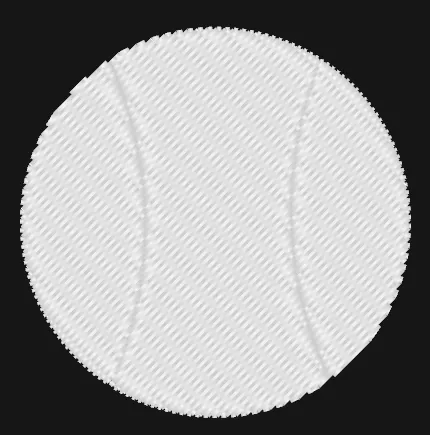 A baseball, in one fill object and one colour. The two seams are guides assigned as cut lines — every row breaks where it crosses them, and the column of needle drops is what reads as the seam.
Guides vs reference images vs the grid
Section titled “Guides vs reference images vs the grid”Three different things get called “guides” in embroidery software, so to be clear about which is which in Octostitch:
| What it is | |
|---|---|
| Guide (this page) | A drawn path that steers a fill’s direction or cuts a seam through it |
| Reference image | Imported artwork on the canvas to trace over |
| Grid, axes & alignment guides | Visual alignment aids while you draw and edit nodes |