
Thread palettes
Octostitch colours your design from real thread brand charts, so the colours you see on screen correspond to threads you can actually buy and sew. Colours live in the thread bar along the bottom of the window.
Brand charts
Section titled “Brand charts”Octostitch ships with these brand palettes:
- Brother
- Gunold
- Isacord
- Madeira Classic 40
- Robison-Anton
- Sulky
Pick a brand from the dropdown in the thread bar (in Library mode) to see its full chart of swatches. Each swatch shows the thread’s code in the corner, and hovering shows its name — so the colour carries its real-world identity through to the worksheet and export.
The three views
Section titled “The three views”The thread bar has three views:
- Library — the full chart for the selected brand.
- Used — only the colours already used in your design.
- Recent — colours you’ve applied recently (most-recent first).
Assigning a thread
Section titled “Assigning a thread”- Select one or more objects (or a text box).
- Click a swatch in the thread bar.
The selected objects take that colour, and the thread’s brand, code and name are remembered with them — not just the RGB value. That provenance is what lets the worksheet list an accurate shopping-list of threads.
Assigning a thread to a gradient stop
Section titled “Assigning a thread to a gradient stop”When a fill has a gradient and you have one of its stops selected, the thread bar aims at that stop rather than at the whole object — so clicking a swatch names that one colour of the ramp and leaves the rest alone.
Stops carry the same provenance an object’s colour does, so an exported gradient lists real threads with their catalogue numbers, not bare RGB. Picking a stop’s colour from the swatch dialog by hand instead clears that link, as you’d expect.
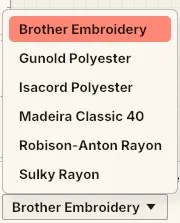 Picking a brand palette from the thread bar — the swatches below switch to that brand’s threads.