
Licensing & activation
Octostitch is licensed per machine. Your licence key is emailed to you after purchase, and you activate each computer you install it on. Activation unlocks Save and Export — you can open, draw and experiment before activating, but saving your work and exporting a machine file require an active licence.
Activating your licence key
Section titled “Activating your licence key”- Open Octostitch and choose Help → License… (the licence dialog also appears automatically if you try to Save or Export before activating).
- Paste your licence key into the field.
- Click Activate.
Octostitch contacts the licensing server, registers this machine, and — on success — shows an “Activation successful” confirmation. Save and Export are now unlocked.
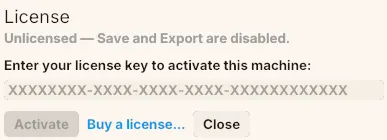 The License dialog — paste your key and click Activate.
If a key is rejected, the dialog explains why in plain language — an unrecognised key, an expired key, or a key that has already been activated on the maximum number of machines.
Offline use
Section titled “Offline use”Activation happens online, but Octostitch doesn’t need a constant connection. After a successful activation it re-checks your licence at launch; if it can’t reach the internet, it keeps working within a 14-day offline grace period measured from the last successful check. Reconnect within that window and the grace period resets.
Moving to a new machine
Section titled “Moving to a new machine”Each licence covers a limited number of machines. To move your licence to a different computer, free the seat on the old one first:
- On the old machine, open Help → License…
- Click Deactivate this machine.
This releases the activation so you can activate on the new computer. If you’ve lost
access to the old machine, contact support at support@octostitch.com.
Buying a licence
Section titled “Buying a licence”Octostitch is a one-time purchase of £40. If you don’t have a key yet, buy Octostitch now or see the full feature list and pricing on the Octostitch homepage. You can also use the Buy a licence… link in the licence dialog. Your licence key is emailed to you after checkout.