
Using bundled & TTF fonts
Octostitch lettering can come from three kinds of font source:
- Bundled fonts that ship with the app.
- TrueType (
.ttf) fonts you load from your computer. .octofontsatin fonts — purpose-built embroidery fonts (see Creating .octofont fonts).
Bundled fonts
Section titled “Bundled fonts”Octostitch ships with fonts of both kinds, all available without loading anything.
Satin .octofont fonts — purpose-built for embroidery, so they letter as satin
columns with proper underlay rather than as filled outlines:
- Orbit — a geometric sans, and the font a new text box starts in
- Octon — a heavy sans
- Lauren — a script
TrueType fonts — outline fonts that get filled:
- Inter Bold
- Inter
For anything small, reach for one of the .octofont fonts first — see the note on TTF
sizes below.
You can modify a bundled .octofont: editing one forks a copy into your own fonts
folder, which then shadows the original. The bundled file itself is read-only and is
never written back, so you can always get back to it by removing your copy.
Choosing a font
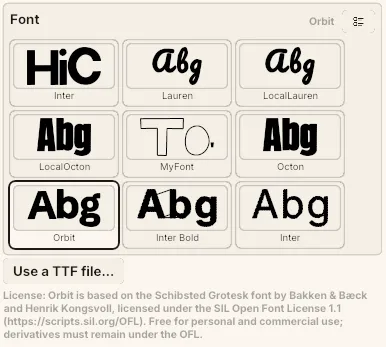
Section titled “Choosing a font”A font’s name is the one thing about it that says nothing, so the Font picker in a
text box’s settings shows a specimen of each font actually sewn — the word Abg,
stitched in that font in the text box’s own thread colour. A satin .octofont comes out
as satin strokes and a TTF as the solid fill its outlines are stitched into, which is
exactly the difference a drawing of the letter shapes would hide. Each entry is
captioned with what it is — a stitch font and its character count, or an outline font
that gets auto-stitched — and the selected font’s name sits in the picker’s header.
The button in its top-right corner switches between a list and a grid of specimens — the same toggle the tatami pattern and decorative motif pickers use, sharing one setting between all three.
Loading a custom TTF
Section titled “Loading a custom TTF”You can point Octostitch at your own TrueType font file and letter with it.
- Select a text box.
- Click Use a TTF file…, under the font picker in its settings.
- Pick a
.ttfor.otffile. The text re-lays out in that font immediately, and the font joins the picker with a specimen of its own.
TTF glyphs come in as filled outlines — the letter shapes are treated as closed regions and given a fill, using non-zero winding so counters and crossbars (the hole in an “o”, the junction of a “t”) resolve correctly.
Sharing a design that uses a TTF
Section titled “Sharing a design that uses a TTF”A saved design stores a TTF by its file path, so the font file has to exist on any
machine that opens it. .octofont satin fonts behave differently — those are
embedded in the design file, so a project you send someone else keeps its lettering
even if they don’t have the font installed.
If you’re sending work out, that’s a good reason to letter with an .octofont.
 The Font picker in a text box’s settings — a stitched specimen of each font, with Use a TTF file… beneath for loading your own.